CARD for Superset
CARD for Superset is the connector that completes the Schema Builder → Apache Superset pipeline. It runs as a Docker container on the same SureCentric Docker network as Superset, DuckDB, PostgreSQL, and the Schema Builder services — making it a zero-configuration bridge between JSON-LD schema authoring and live BI dashboards.
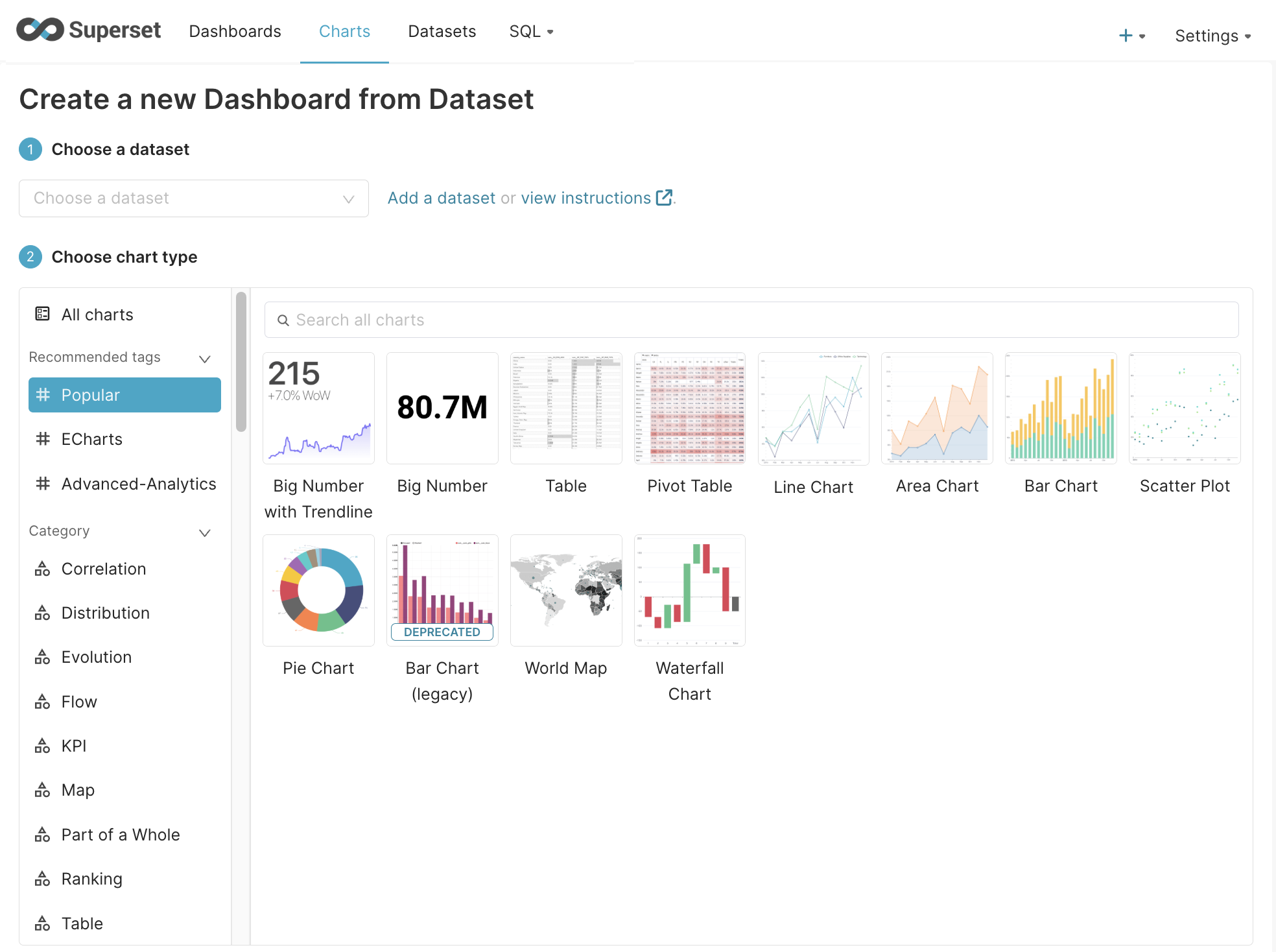 Apache Superset Dashboard Creation via SchemaBuilder CARD API
What It Does
When you click ▶ Provision in the CARD Profile Editor, CARD for Superset:
- Reads the active CARD Profile config from PostgreSQL
- Generates
CREATE TABLEDDL from the active JSON-LD schema (via the DuckDB SQL plugin) - Executes the DDL against DuckDB — creating the schema tables
- Generates
INSERT INTOseed data via the Seed Dataset Generator plugin (if enabled) - Executes the INSERTs against DuckDB — populating the tables with realistic data
- Authenticates with the Superset REST API
- Creates or finds the
ClinicalDuckDBdatabase connection in Superset - Registers each table as a Superset Dataset
- Optionally creates three seed charts and a starter dashboard
- Returns per-step results to Schema Builder as a success/failure toast
Zero manual steps in Superset. The full pipeline completes in under 30 seconds.
Architecture
┌─────────────────────────────────────────────────────────────────────────┐
│  Schema Builder  (Vue 3, :5173)                                         │
│                                                                         │
│  1. User opens/imports JSON-LD schema (e.g. eClinical ontology)        │
│  2. Mapper View → select nodes → choose "SQL DDL (DuckDB)"            │
│  3. CARD Profile Editor → configure Schemas, Datasets, Plugins, Viz   │
│  4. Click [▶ Provision]                                                │
└─────────────────────────────┬───────────────────────────────────────────┘
                              │  POST /api/sb/card-profiles/:id/provision
                              ▼
┌─────────────────────────────────────────────────────────────────────────┐
│  card-api  (Node.js 20 / Express, :3099)                               │
│                                                                         │
│  Step A: Read CARD Profile config from PostgreSQL                      │
│  Step B: Generate DDL from active schemas (sql-duckdb plugin)          │
│  Step C: Execute DDL against DuckDB (CREATE TABLE statements)          │
│  Step D: Generate seed data (Seed Dataset Generator, faker.js)         │
│  Step E: Execute INSERTs against DuckDB                                │
│  Step F: Authenticate with Superset → POST /api/v1/security/login     │
│  Step G: Create/find ClinicalDuckDB database connection                │
│  Step H: Register each table as a Superset Dataset                     │
│  Step I: (optional) Create 3 seed charts + starter dashboard           │
│  Step J: Return per-step results → Schema Builder toast                │
└─────────────────────────────┬───────────────────────────────────────────┘
                              │
              ┌───────────────┴──────────────────┐
              ▼                                  ▼
┌─────────────────────┐              ┌───────────────────────────────────┐
│  DuckDB  (v1.2.1)   │              │  Apache Superset  (:8088)         │
│                     │              │                                   │
│  clinical_site      │              │  ✅ ClinicalDuckDB (database)     │
│  patient            │◄─────────── │  ✅ Datasets (one per table)      │
│  visit              │  SQLAlchemy  │  ✅ Charts (Visits, AEs, Sites)   │
│  adverse_event      │             │  ✅ Dashboard: "[Profile] Demo"    │
└─────────────────────┘              └───────────────────────────────────┘
All services run on the SureCentric Docker network — card-api reaches DuckDB and Superset by container name, with no port exposure required between services.
Quick Start for Apache Superset
This guide walks you through standing up the full Schema Builder → CARD → Superset pipeline from scratch and creating your first live dashboard in under five minutes.
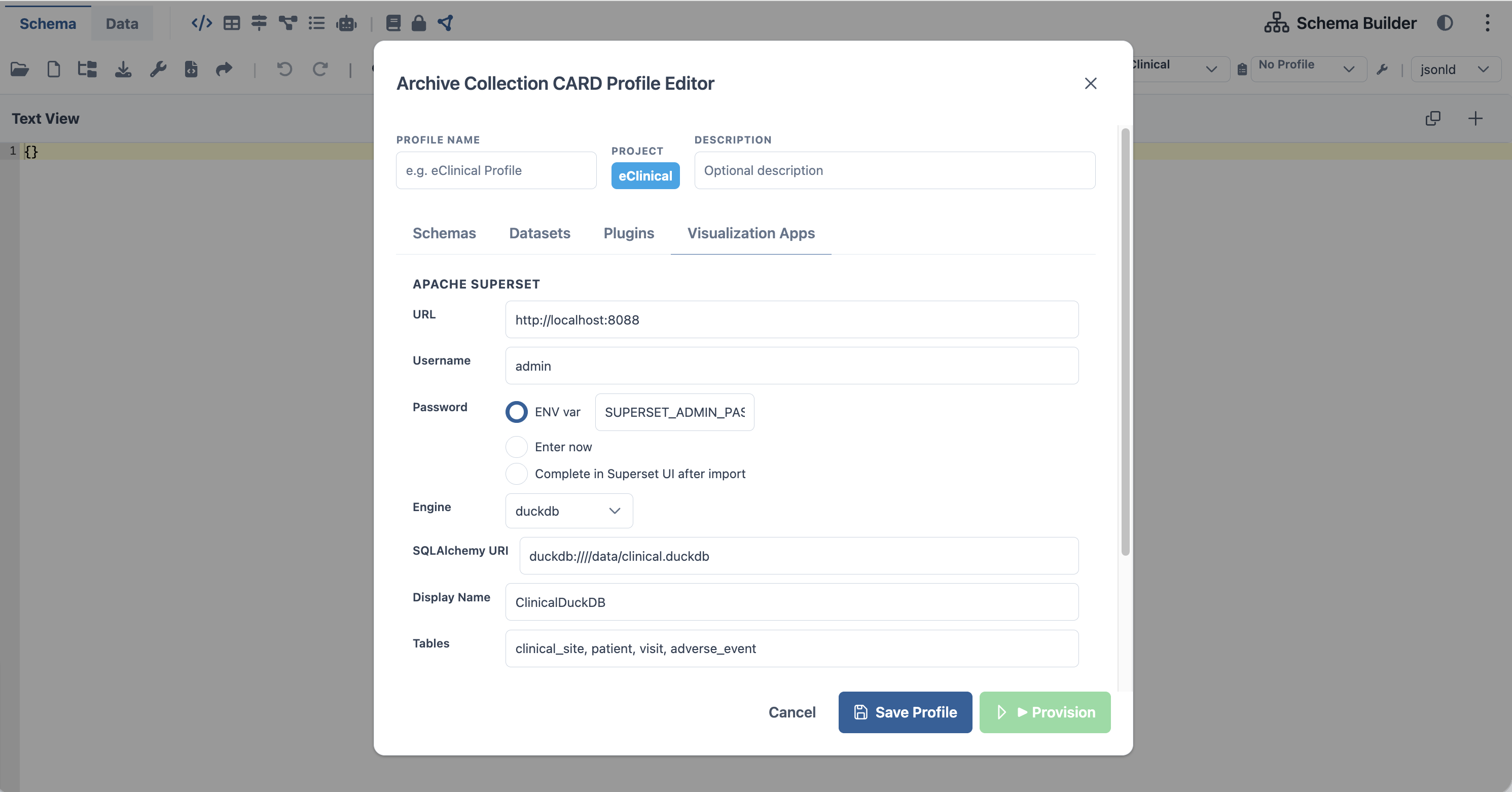 CARD Profile Editor — Visualization Apps tab with Superset connection configured
Prerequisites
- Docker Desktop installed and running
- The SureCentric repo cloned:
git clone https://github.com/SureClinical/SureCentric.git - Node.js 20+ for running Schema Builder locally
Step 1 — Start the Docker Stack
From the repo root:
cd SureCentric/
docker compose up -d
Wait for all containers to report healthy:
docker compose ps
# NAME                    STATUS
# surecentric-card-api    Up (healthy)
# superset_app            Up (healthy)
# superset_db             Up
# superset_cache          Up
# surecentric-duckdb      Up
Verify the CARD API is responding:
curl http://localhost:3099/health
# → {"status":"ok","service":"card-api"}
Open Superset at http://localhost:8088 and log in with admin / admin (or the value of SUPERSET_ADMIN_PASSWORD in your .env).
Step 2 — Start Schema Builder
cd SchemaBuilder/meta_configurator/
npm install        # first time only
npm run dev
# → http://localhost:5173/schema-builder/#/schema
Step 3 — Create a Project
- Click the
⋮(three-dot) menu in the top-right toolbar - Select Create Project
- Enter a project name (e.g.
eClinical) and save - The Project Switcher in the bottom toolbar now shows your project
Step 4 — Open the CARD Profile Editor
In the bottom toolbar, next to the CARD Profile combobox, click the 🔧 wrench icon.
The CARD Profile Editor dialog opens with four tabs:
| Tab | What to configure |
|---|---|
| Schemas | Select which JSON-LD schema is active for this profile |
| Datasets | Enable seed data and set row counts per table |
| Plugins | Enable sql-duckdb and seed-data-generator plugins |
| Visualization Apps | Configure the Superset connection |
Step 5 — Configure the Visualization Apps Tab
Switch to the Visualization Apps tab and fill in:
| Field | Value |
|---|---|
| Superset URL | http://localhost:8088 |
| Display Name | ClinicalDuckDB (shown in Superset) |
| Username | admin |
| Password mode | ENV var — enter SUPERSET_ADMIN_PASSWORD |
| Database engine | duckdb |
| SQLAlchemy URI | duckdb:////data/clinical.duckdb |
| Tables | clinical_site, patient, visit, adverse_event |
Choose ENV var mode and enter SUPERSET_ADMIN_PASSWORD. The card-api resolves the actual password from process.env.SUPERSET_ADMIN_PASSWORD at runtime — the credential is never written to the database.
Switched to the Datasets tab, enable Include seed dataset and set row counts:
clinical_site: 8patient: 50visit: 150adverse_event: 30
Click [Save Profile] — the profile is saved to PostgreSQL via POST /api/sb/card-profiles.
Step 6 — Click [\u25b6 Provision]
Click the [\u25b6 Provision] button in the CARD Profile Editor footer.
Schema Builder calls POST /api/sb/card-profiles/:id/provision. The card-api runs the full pipeline:
① Authenticate with Superset   → POST /api/v1/security/login
② Create ClinicalDuckDB connection → POST /api/v1/database/
③ Register datasets             → POST /api/v1/dataset/ (one per table)
④ Return results               → Schema Builder shows success toast
A toast notification confirms each step. If any step fails, the error message tells you exactly which API call failed.
Step 7 — Build Your Dashboard in Superset
- Open http://localhost:8088
- Go to SQL Lab → select
ClinicalDuckDB - Run a query to verify data:
SELECT * FROM patient LIMIT 10; - Go to Datasets — you should see
clinical_site,patient,visit,adverse_event - Click Charts → + Chart → select a dataset and chart type → save
- Click Dashboards → + Dashboard → drag charts in
You now have a live Superset dashboard backed by your JSON-LD schema. Re-run [\u25b6 Provision] at any time to refresh the database connection and re-register datasets.
Troubleshooting
| Symptom | Fix |
|---|---|
card-api returns Superset login failed: 401 | Check SUPERSET_ADMIN_PASSWORD env var in docker-compose.yml matches your Superset admin password |
| Datasets not appearing in Superset | Verify tables list in Viz Apps tab matches actual DuckDB table names; check DuckDB file path in sqlalchemy_uri |
card-api returns Profile not found | Ensure you clicked [Save Profile] before [\u25b6 Provision] |
| Superset shows "Database not found" | The ClinicalDuckDB connection may need the duckdb-engine Python package; verify it is in docker/superset/requirements-local.txt |
| DuckDB file is empty | Seed data is only generated if Include seed dataset is enabled in the Datasets tab and the seed-data-generator plugin is active in the Plugins tab |
| Container | Image | Port | Role |
|---|---|---|---|
surecentric-card-api | node:20-alpine | 3099 | CARD API — orchestrates provisioning |
surecentric-duckdb | datacatering/duckdb:v1.2.1 | — | DuckDB analytical database |
superset_app | apache/superset:4.0.0 | 8088 | Apache Superset BI platform |
superset_db | postgres:17 | 5432 | Superset metadata + CARD profile storage |
superset_cache | redis:7 | 6379 | Superset cache layer |
Starting the Stack
# Start all CARD for Superset services
docker compose up -d

# Verify card-api is healthy
curl http://localhost:3099/health
# → {"status":"ok","service":"card-api"}

# Verify Superset is reachable
curl -s -o /dev/null -w "%{http_code}" http://localhost:8088/health
# → 200
Docker Network
All services join the SureCentric bridge network defined in docker-compose.yml. The card-api container addresses DuckDB and Superset by their service names (e.g., http://superset_app:8088, duckdb:///data/<profile_id>.duckdb).
The /provision Endpoint
POST /api/sb/card-profiles/:id/provision
Source: card-api/src/routes/cardProfiles.ts
Request
No body required. The profile ID in the URL path identifies which CARD Profile config to execute. Superset credentials are resolved from environment variables at runtime — they are never stored as plaintext in the profile config.
curl -X POST http://localhost:3099/api/sb/card-profiles/abc-123/provision
Response
{
  "profile_id": "abc-123",
  "steps": [
    { "name": "ddl",        "status": "ok", "tables": ["clinical_site", "patient", "visit"] },
    { "name": "seed",       "status": "ok", "rows":   { "clinical_site": 8, "patient": 50, "visit": 150 } },
    { "name": "superset_db","status": "ok", "database_id": 4 },
    { "name": "datasets",   "status": "ok", "dataset_ids": [12, 13, 14] },
    { "name": "dashboard",  "status": "ok", "dashboard_id": 7 }
  ]
}
Each step is independent — a failed seed step does not abort the Superset provisioning steps.
Provisioning Services
| Service | Source File | Responsibility |
|---|---|---|
ddlGenerator | card-api/src/services/ddlGenerator.ts | Translates JSON-LD schema → CREATE TABLE DDL via the DuckDB SQL plugin logic |
seedGenerator | card-api/src/services/seedGenerator.ts | Generates faker.js-based INSERT INTO statements from table definitions + row count config |
duckdbConnector | card-api/src/services/duckdbConnector.ts | Executes DDL and INSERTs against /data/<profile_id>.duckdb; verifies tables and row counts |
supersetProvisioner | card-api/src/services/supersetProvisioner.ts | Idempotent Superset provisioning — skips already-registered DB connections and datasets |
chartTemplates | card-api/src/services/chartTemplates.ts | Superset chart JSON templates for seed charts; dashboard grouping |
Seed Charts
When auto_generate_charts: true is set in the CARD Profile config, the provisioner creates three starter charts:
| Chart | Type | SQL |
|---|---|---|
| Visits by Type | Bar | SELECT visit_type, COUNT(*) FROM visit GROUP BY 1 |
| AE Severity Distribution | Pie | SELECT severity, COUNT(*) FROM adverse_event GROUP BY 1 |
| Enrollment by Site | Bar | SELECT s.site_name, COUNT(p.patient_id) FROM clinical_site s JOIN patient p ON s.site_id = p.site_id GROUP BY 1 |
All three charts are grouped into a "[Profile Name] Demo" starter dashboard. Charts can be edited, cloned, or replaced in Superset after provisioning.
DuckDB Scoping
Each CARD Profile gets its own DuckDB file:
/data/<profile_id>.duckdb
This provides simple isolation — reprovisioning a profile replaces only its own DuckDB file, leaving other profiles untouched. The duckdbConnector service resolves the path from the profile ID at runtime.
End-to-End User Journey
1. Open Schema Builder → select "eClinical" from CARD Combobox
   → activates eclinical-ehr-subset.jsonld, sql-duckdb, seed-data-generator plugins

2. Open Mapper View → select nodes → review table/column mappings

3. Click 🔧 → CARD Profile Editor opens
   → Schemas tab:   activate eclinical-ehr-subset.jsonld
   → Datasets tab:  Faker seed, 50 patients / 150 visits / 8 sites
   → Plugins tab:   sql-duckdb + seed-data-generator active
   → Viz Apps tab:  Superset URL + admin credentials configured

4. Click [▶ Provision]
   → card-api: generates DDL → executes on DuckDB → generates seed data
   → card-api: authenticates Superset → creates ClinicalDuckDB connection
   → card-api: registers 4 datasets → creates 3 charts → creates dashboard
   → Schema Builder: per-step toast "✅ DDL · ✅ Seed · ✅ Superset · ✅ Dashboard"

5. Open Superset → Databases → ClinicalDuckDB ✓
   → 4 datasets ready → "eClinical Demo" dashboard with live charts
Secrets and Security
Superset credentials are never stored as plaintext in the CARD Profile config JSONB. The visualization_apps config references only an environment variable name:
{
  "visualization_apps": [{
    "app_id": "apache-superset",
    "connection": {
      "superset_url": "http://superset_app:8088",
      "username": "admin",
      "password_secret_ref": "SUPERSET_ADMIN_PASSWORD"  // env var name only
    }
  }]
}
The provision endpoint resolves the value at runtime via process.env[connection.password_secret_ref]. The actual password lives only in the Docker environment / secrets manager and is never written to the database.
Implementation Status
| Phase | Name | Status |
|---|---|---|
| C-0 | Docker stack (Superset 4.0.0, DuckDB v1.2.1, PostgreSQL 17, Redis 7) | ✅ Complete |
| C-1 | CARD API — REST CRUD + Docker service | ✅ Complete |
| C-2a | Project Switcher + CARD Profile Combobox in Schema Builder toolbar | ✅ Complete |
| C-2b | CARD Profile Editor dialog — full 4-tab implementation | 🔲 Pending (Sprint S-3) |
| C-3 | /provision endpoint — DDL → DuckDB → seed → Superset provisioner | 🔲 Pending (Sprint S-4) |
| C-4 | End-to-end demo + starter dashboard + seed charts | 🔲 Pending (Sprint S-5) |
Verification
# After running [▶ Provision]:

# 1. Verify card-api step results
curl -X POST http://localhost:3099/api/sb/card-profiles/<id>/provision
# → all steps status: "ok"

# 2. Verify DuckDB tables
duckdb /data/<profile_id>.duckdb "SHOW TABLES;"
# → clinical_site, patient, visit, adverse_event

# 3. Verify Superset datasets (requires auth token)
curl http://localhost:8088/api/v1/dataset/ -H "Authorization: Bearer <token>"
# → dataset list includes clinical tables

# 4. Verify dashboard
curl http://localhost:8088/api/v1/dashboard/ -H "Authorization: Bearer <token>"
# → contains "[Profile Name] Demo" dashboard