Schema Builder
Schema Builder is SureCentric's AI-assisted visual schema workbench for creating, editing, validating, and translating structured schemas across JSON-LD, OWL/RDF, SQL DDL, and JSON Schema formats.
In This Section
- Introduction — Vision, the problem, and the solution
- Tech Architecture — Pipeline diagram, layer responsibilities, and technology stack
- How It Works — Session modes, panels, and boot sequence
- Schema Builder Features — Features overview: Schema Mode, Data Mode, and Toolbar Reference
- UI Reference — Full UI component map with codebase links for every toolbar icon, panel, and dialog
- Plugin System — ES module plugin system, loading, registry, and sandboxing
- CARD System — Any schema, any dataset, any AI, any visualizer
- Developer Reference — Architecture, data flow, key files, and extension points
- Plugin Authoring Guide — Build and deploy custom plugins
- Plugins Registry — Overview and index of all built-in plugins
- Seed Dataset Generator — Generate SQL INSERT seed data using faker.js
Introduction
Schema Builder is SureCentric's AI-assisted visual schema workbench — a purpose-built tool for creating, editing, validating, and translating structured schemas across JSON-LD, OWL/RDF, SQL DDL, and JSON Schema formats. It is the primary authoring surface for the SureCentric platform's semantic layer.
Built as an enhanced fork of MetaConfigurator (Vue 3, MIT License), Schema Builder adds native JSON-LD support, clinical ontology integration, a plugin translation pipeline, an AI view, and the CARD system for end-to-end dataset provisioning.
It runs as:
- A standalone web application (
npm run devinSchemaBuilder/meta_configurator/) - An iframe-embedded service inside the SureClinical AngularJS web client
- A headless translation service invoked programmatically via plugins
Vision
Schema Builder provides a pre-configured, machine-readable and human-readable schema editor, viewer, and schema generator to support existing SureDrive-based archives with OWL/Nuxeo-based schemas, and adds the ability to generate JSON and DDL for SQL-based databases.
Based on a core schema of JSON-LD, Schema Builder can translate and export to OWL or JSON format. For JSON format, Schema Builder can export to a Schema Catalog or Registry that is used by Apache Superset for the creation of dataset dashboards, reports, charts, and SQL queries.
The Problem
Clinical organizations operate across fragmented, incompatible schema worlds:
| World | Format | Used For |
|---|---|---|
| Document archives (SureDrive, Nuxeo) | OWL / RDF-XML | Regulatory content models, eTMF, EHR |
| Relational analytics (Superset, Grafana) | SQL DDL | Dashboards, reports, SQL Lab |
| API contracts and validation | JSON Schema | REST APIs, data validation |
| Semantic web and linked data | JSON-LD | Ontology integration, knowledge graphs |
Moving a schema between these worlds today requires bespoke conversion tooling, manual DDL authoring, repeated re-entry of the same structural information, and brittle one-way transformations. There is no single canonical representation, no audit trail, and no reproducible pipeline.
The Solution
Schema Builder makes JSON-LD the pivot format — a single canonical representation that is simultaneously:
- Valid JSON (readable by any JSON tool)
- Valid JSON-LD 1.1 (W3C-compliant linked data, processed by
jsonld.js) - The single source of truth for all downstream exports
From one JSON-LD schema, Schema Builder generates:
JSON-LD Schema (canonical)
        │
        ├──► OWL / RDF-XML    → SureDrive archives, Nuxeo content models
        ├──► SQL DDL           → PostgreSQL / DuckDB CREATE TABLE statements
        ├──► JSON Schema       → API validation, schema registries
        └──► SQL INSERT data   → Faker.js seed datasets for Superset dashboards
Every schema change propagates through the pipeline. The same schema that governs a SureDrive archive also generates the analytics warehouse tables and seeds the dashboard data.
Tech Architecture
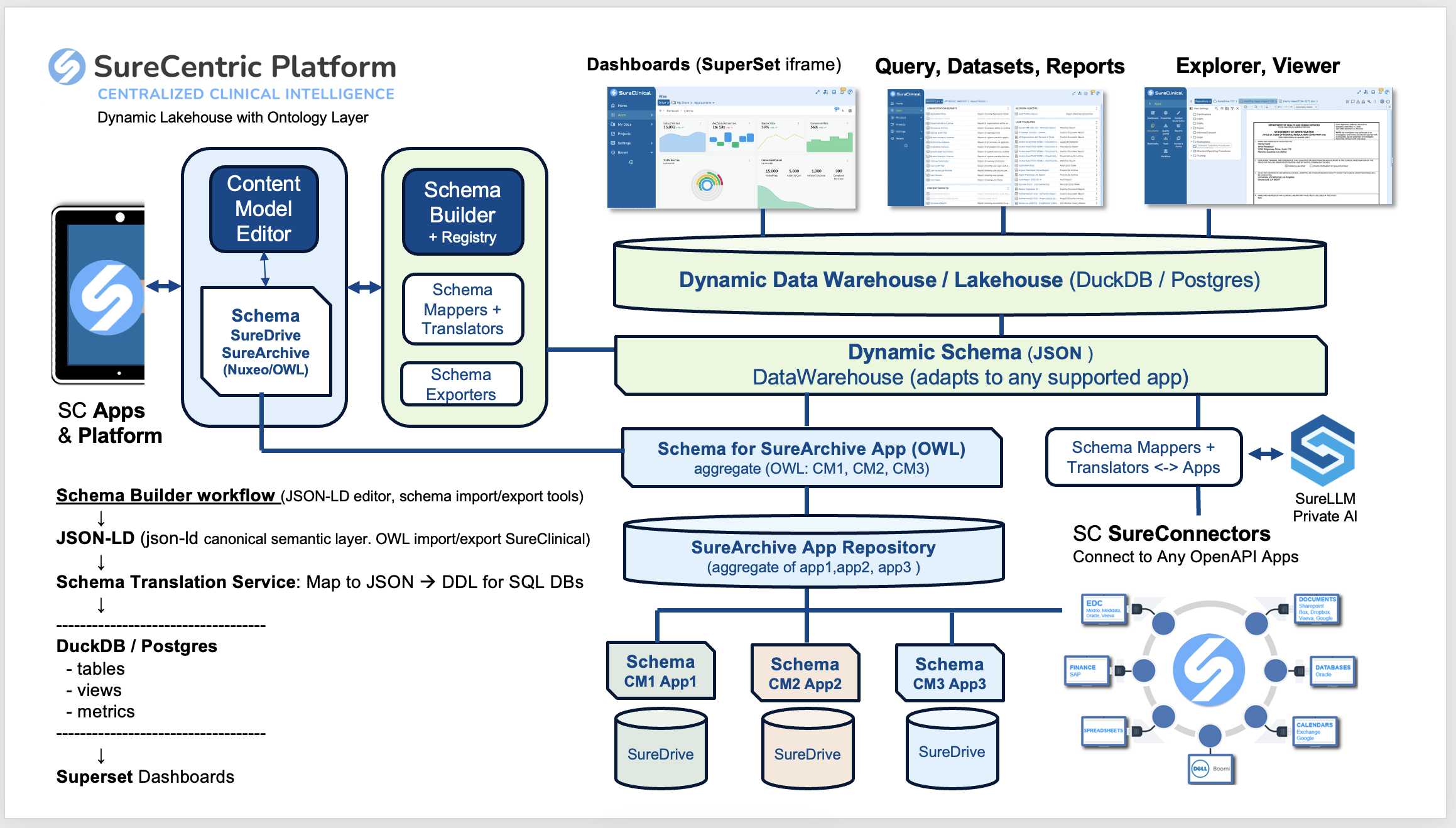
Pipeline Flow
① JSON-LD Editor (Schema Builder)
   • Author schemas with @context, @type, @id
   • SPARQL autocompletion against ontology endpoints
   • Real-time AJV + JSON-LD 1.1 validation
   • Visual diagram (Vue Flow)

            ↓

② JSON-LD Canonical Layer
   • CareLex/eClinical @context namespace
   • OWL import/export for SureClinical archives
   • Versioned schema catalog/registry

            ↓

③ Schema Translation Service (Mapper View + Plugins)
   • JSON-LD → DDL (PostgreSQL / DuckDB CREATE TABLE)
   • JSON-LD → OWL (Nuxeo archive format)
   • JSON-LD → JSON Schema (API validation)
   • JSON-LD → SQL INSERT (Faker.js seed data)

            ↓

④ Data Warehouse / Lakehouse + Visualizer
   • Tables, views, metrics auto-created from DDL
   • Superset datasets auto-registered via CARD /provision
   • NL2SQL grounded by compiled schema metadata
How Schema Builder Works
Schema Builder operates in three session modes, selectable via the tab strip at the top of the toolbar (defined in sessionMode.ts):
| Mode | Route | Purpose |
|---|---|---|
| Schema Mode | /schema | Author, edit, visualize, and translate JSON-LD schemas |
| Data Mode | /data | Edit and validate data documents against the active schema |
| Settings Mode | /settings | Configure Schema Builder's own behaviour via a settings schema |
Each mode activates a different set of panels — resizable, togglable panes each providing a distinct view or editing surface. The active panel layout is persisted in sessionStore.ts.
Schema Mode
Schema Mode is the primary mode for authoring and managing JSON-LD schemas. It provides six panels:
Text View — Code Editor
The raw code editor panel — powered by Ace Editor — provides direct JSON/YAML/XML editing with syntax highlighting and inline validation annotations.
Source: CodeEditorPanel.vue · AceEditor.vue
- Bidirectionally synced with all other panels — any change anywhere reflects here immediately
- Inline error annotations from AJV (JSON Schema Draft 2020-12) and the custom JSON-LD 1.1 multi-error linter
- Format selector in the bottom toolbar switches between JSON, YAML, and XML representations
- Full undo/redo stack with edit history
GUI View — Visual Editor
A schema-driven property tree editor that renders the active JSON-LD document as a navigable, form-like interface — no JSON syntax knowledge required.
Source: GuiEditorPanel.vue
- Renders a
SchemaInfoPanelshowing which schema governs the current view - Warns if the schema contains unresolved external
$refreferences - Per-property panels render type-appropriate input controls for strings, numbers, booleans, arrays, and objects
- Click any node in the property tree to navigate and select it — selection syncs across all open panels
Diagram View — Schema Graph
An interactive node-graph powered by Vue Flow that visualizes JSON Schema types, properties, and $ref relationships as a navigable diagram.
Source: SchemaDiagramPanel.vue
- Zoom, pan, and click nodes to navigate — clicking a node selects it in all other panels
- In-diagram editing when edit mode is enabled
- Detects JSON-LD documents (vs. JSON Schema) by checking for
@context,@graph,@id/@typeat root and shows a contextual hint overlay
Mapper View — Translation Workbench
The Mapper View is Schema Builder's schema translation engine — the primary surface for generating SQL DDL, OWL, and other output formats from a JSON-LD schema.
Source: MapperPanel.vue · mapperTypes.ts
How it works:
- Loads all JSON-LD nodes from the active schema as
MappingRow[]— each row has:nodeId,nodeType(e.g.owl:Class,owl:DatatypeProperty),nodeLabel,mapTo(editable target name),targetType,notes,selected - User selects rows and sets their target names and types
- User picks an output format from the plugin-driven dropdown
- Output is previewed inline and exported
Supported output formats (via the Plugin System):
| Format | Plugin | Status |
|---|---|---|
| PostgreSQL DDL | com.sureclinical.sql-postgresql | ✅ Built-in |
| DuckDB DDL | com.sureclinical.sql-duckdb | ✅ Built-in |
| SQL INSERT seed data | com.sureclinical.seed-data-generator | ✅ Built-in |
| RDF Turtle, XLSX, JSON, OWL | Custom plugins | 🔲 Extensible |
Mapper state (row selections, target names, notes) saves and loads as .mapper.json sidecar files. Table zoom (0.5×–1.5×) and row filters (all / selected / unselected) aid large-schema navigation.
AI View — Schema AI Assistant
The AI View provides a natural-language interface for creating, modifying, querying, and exporting schemas using any OpenAI-compatible LLM endpoint.
Source: AiPromptsPanel.vue · AiPromptsSchema.vue · aiEndpoint.ts
| AI Action | Description |
|---|---|
| Create schema | Describe a schema in natural language → Schema Builder generates a JSON-LD schema |
| Modify schema | "Add a patient_id field as a UUID primary key" → AI applies the change |
| Ask a question | "What does this owl:Class represent?" → AI answers in context |
| Export / convert | "Convert this to a FHIR-compatible JSON Schema" → AI reformats |
Configuration: Default endpoint https://api.openai.com/v1/chat/completions, default model gpt-4o-mini. Any OpenAI-compatible endpoint (Azure OpenAI, SureLLM, local Ollama) works. Set via the Settings schema (aiIntegration key).
Security: API key stored in a reactive in-memory ref only, optionally persisted to sessionStorage (cleared when tab closes). Never written to localStorage. See apiKey.ts.
Documentation View
Converts the active JSON Schema to structured Markdown documentation, rendered as HTML.
Source: DocumentationPanel.vue
- Auto-generates human-readable docs from any JSON Schema — entity names, descriptions, properties, types, constraints
- Navigation anchors sync with schema editor selection
- "Download Markdown" button exports the generated documentation
Data Mode
Data Mode switches Schema Builder into a dataset editor — the active JSON-LD schema governs validation of a live data document. All panels are re-purposed for data rather than schema editing.
Data Editing Panels
| Panel | Data Mode Behavior |
|---|---|
| Text View | Edit raw JSON/YAML data with AJV validation running against the active schema |
| GUI View | Form-driven data entry governed by the schema's property definitions |
| Table View | ListAnalysisPanel.vue — detects all arrays in the document and renders a sortable, paginated DataTable with CSV export |
| AI View | Data-specific AI operations (generate, modify, ask, export) |
Table View
The Table View is especially useful for JSON-LD ontologies — it detects all arrays (including root-level @graph arrays) and renders them as structured grids with sorting, pagination, grid lines, and striped rows. Built-in CSV export.
Data Mode AI Operations
The AI View routes to AiPromptsData.vue in Data Mode:
| Action | Description |
|---|---|
| Generate data | "Generate 20 patient records matching this schema" → AI produces validated JSON |
| Modify data | "Set all status fields to active" → AI applies the change |
| Ask a question | "How many records have a missing visit_date?" → AI answers |
| Export to format | "Convert this JSON to CSV" → AI reformats |
Data Import and Transform
- CSV Import — convert a CSV file to a JSON array document
- Data Mapping dialog — AI-assisted transform to align an imported dataset to the active schema's structure
- Data Export dialog — export data via a Handlebars-style text template
- Infer Schema from Data — auto-generate a JSON Schema from any loaded data document
- Drag-and-drop — drop any
.json,.jsonld,.csv, or.yamlfile onto any panel to load it - Snapshot sharing — encode the full state (schema + data) into a shareable URL
Toolbar Reference
The toolbar has two rows, implemented in TopToolbar.vue and menuItems.ts:
Row 1 (top): Mode selector (Schema / Data / Settings) · mode-specific action icons · app title · dark/light toggle · ⋮ overflow menu
Row 2 (bottom): Mode-specific action icons · zoom controls · search · Project Switcher · CARD Profile Combobox · format selector
⋮ overflow menu: Create Project · Settings · View Plugins · SureCentric Docs · About Schema Builder · Restore default settings
Schema mode toolbar (bottom row): New Schema · Open File · Import Schema · Download · Utility · Generate Code · Share Snapshot · Undo · Redo · panel toggles (Text / GUI / Diagram / Mapper / AI / Documentation)
Data mode toolbar (bottom row): New Data · Open Data · Import Data · Download · Utility · Share Snapshot · Undo · Redo · panel toggles (Text / GUI / Table / AI)
Plugin System
Schema Builder's translation capabilities are fully extensible via ES module plugins. See the Plugin System page for:
- The
SchemaBuilderPlugininterface (translator,panel,importer,validator,exportertypes) - Loading plugins from URL, file, or programmatically
- Writing plugins for Node.js, Python (via REST adapter), Java Spring Boot, or sandboxed via OpenSandbox
- The Plugin Manager UI (
⋮→ View Plugins)
CARD System
The CARD System connects Schema Builder to any downstream analytics platform via a named, reusable configuration — any schema, any dataset, any AI, any visualizer.
Key components:
- CARD Profile — named config: schemas + datasets + plugins + visualization target
- CARD API — REST service at
:3099for CRUD and/provision - Project Switcher — toolbar combobox scoping all profiles to a project
- CARD Profile Editor — 4-tab dialog (Schemas / Datasets / Plugins / Visualization Apps)
- SS CARD Plugin — Python package that auto-provisions Apache Superset DB connections and datasets
Technology Stack
| Layer | Technology |
|---|---|
| Framework | Vue 3 + Vite + TypeScript |
| UI Components | PrimeVue 4 (Lara preset, SureCentric brand #29619B) |
| JSON-LD processing | jsonld.js (W3C 1.1 processor) |
| JSON Schema validation | AJV (Draft 2020-12) + custom JSON-LD multi-error linter |
| Diagram | Vue Flow + dagre layout |
| Code editor | Ace Editor with gutter annotations |
| Fake data | @faker-js/faker with seeded RNG for reproducibility |
| Plugin loader | Native ES import() with Blob URL sandboxing |
| State management | Pinia (Vue 3 reactive stores + sessionStorage persistence) |
| AI gateway | Any OpenAI-compatible endpoint (default: gpt-4o-mini) |
| Upstream base | MetaConfigurator v2.2.0 (MIT) |